 TisRadar
Features
TisRadar covers the daily work of running social accounts: measuring what happened, deciding what to publish next, publishing it, and handling the responses.
Performance analytics
For every post, reel and story you publish, TisRadar records how it performed over time – views, reach, likes, comments, saves, shares and watch time, depending on what each platform reports. Instead of a single number, you see the shape of the launch: how fast a post gathered views in its first hours, and how that compares with your own previous posts of the same type. On Facebook, Instagram and Threads the results of posts and reels are recorded during the first 48 hours after publication, then every six hours until seven days and once a night until 30 days after publication. When you connect Facebook, Instagram, Threads or TikTok, TisRadar also reads once your posts, reels and videos from the last 180 days with their results at that moment, and again when you ask for it (at most once a day), so the advice has your history from the first day; these earlier results do not change the launch curves. Account-level figures (followers, total likes, video count) are tracked over time as well.
What TisRadar reads from TikTok
For a connected TikTok account, TisRadar reads the account's display name and avatar, account statistics (follower count, likes, number of videos) and the list of the user's own most recent videos with their title, description, publication time, length, share link and cover image, together with their view, like, comment and share counts. These counts are recorded during the first 48 hours after publication, then every six hours until seven days after publication and once a night until 30 days after publication. Once after the account is connected, and again on request at most once a day, TisRadar also lists the public videos from the last 180 days with the same counts. With the separate “TikTok: comments and statistics” connection (TikTok API for Business), which we are switching on gradually, TisRadar also reads whether the account is personal or business, the account's daily figures for the last 60 days, the breakdown of followers by age, gender, country and city as percentages, detailed results of videos from the last 30 days (reach, saves, watch time, the share watched to the end, new followers, retention, impression sources and viewer types), all of these once a day, right after the connection is made and whenever you ask for a refresh, and the comments under those videos for the inbox. TisRadar does not access TikTok direct messages.
What TisRadar reads from YouTube
For a connected YouTube channel, TisRadar reads the channel's id and name (to identify the connected channel) and its statistics (subscribers, total views, number of videos), once a day and again whenever you click Refresh next to the connection. Through YouTube Analytics it reads channel-level audience reports for the last 90 days: age and gender as percentages, views by country and city, average watch time and watch percentage, and traffic sources. For videos that were published through TisRadar it reads their view, like and comment counts during the first 48 hours after publication, then every six hours until seven days after publication and once a night until 30 days after publication, and their retention and traffic sources once a day for 30 days. Once a night it also reads the privacy and processing status of every video published through TisRadar that you have not removed from your statistics, also after the first 30 days, so the application knows whether it is still public. Thumbnails are taken from YouTube's public image addresses. TisRadar does not list or read the other videos on your channel: a video appears in TisRadar only if it was published through TisRadar.
Content radar
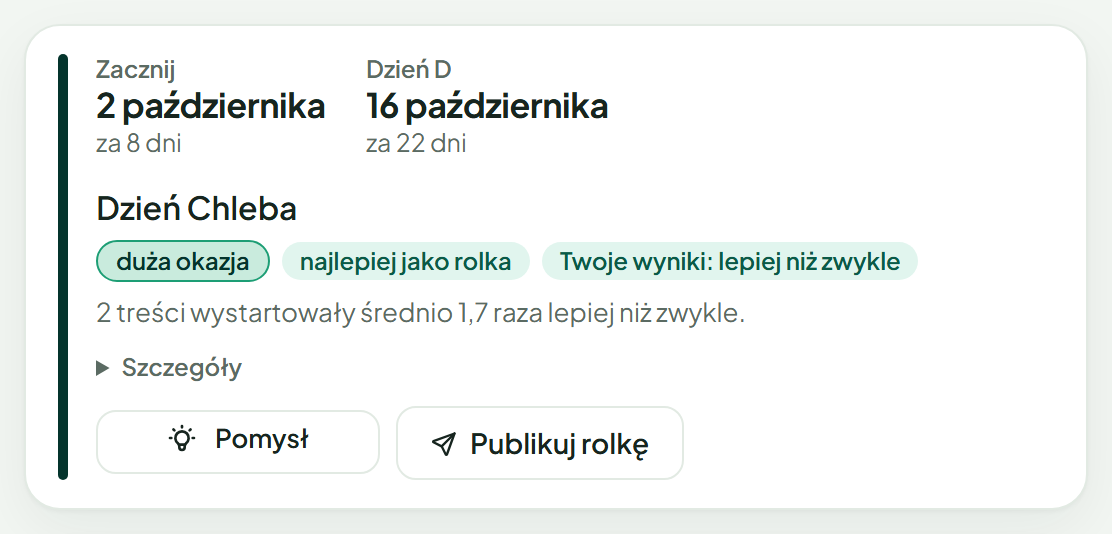
A planning aid built on a calendar of occasions for your niche, drawn up in a short conversation when you start, together with your own past results. Most holidays in the calendar are weighted by how well they fit the topics you described when setting up your profile: Black Friday counts more for a tech or beauty profile than for one about mushrooms. For many holidays it also shows how many times a month people in Poland searched Google for a phrase about the day, this season and in earlier years, so you can see whether interest is warming up; these public search numbers come from Google through a provider of public search data, and nothing from your account is sent to get them. For each occasion it shows when to start recording, well before the day itself, and whether similar content has done better or worse than usual for you. Before the main holidays, and for topics people in Poland are searching for right now outside the holidays, it also suggests, with AI, an angle for your topics: one concrete idea that links what people in Poland search for with what you make; when no angle really fits, we show nothing, and a topic outside the holidays without an angle does not appear at all. Suggestions are just suggestions – nothing is scheduled or published on their basis without the user acting on it.
Direct publishing
You compose a post once – text, photos or video – choose which of your connected accounts should receive it, and publish. TisRadar uses each platform's official publishing API. You can also pick a future time and the post waits in a visible queue that you can cancel until the last moment. If you add a comment to the post, TisRadar places it under the post on Facebook and Threads right after publishing.
When a platform does not confirm the result at once, TisRadar checks the status of that publication on the platform for up to 24 hours and then tells you whether it went out, on the screen and in a notification if you turned them on. It never sends the same content a second time on a guess. When Instagram, Threads or YouTube says a publication did not go out and the upload can still be used, Send again publishes that same upload, only when you tap it.
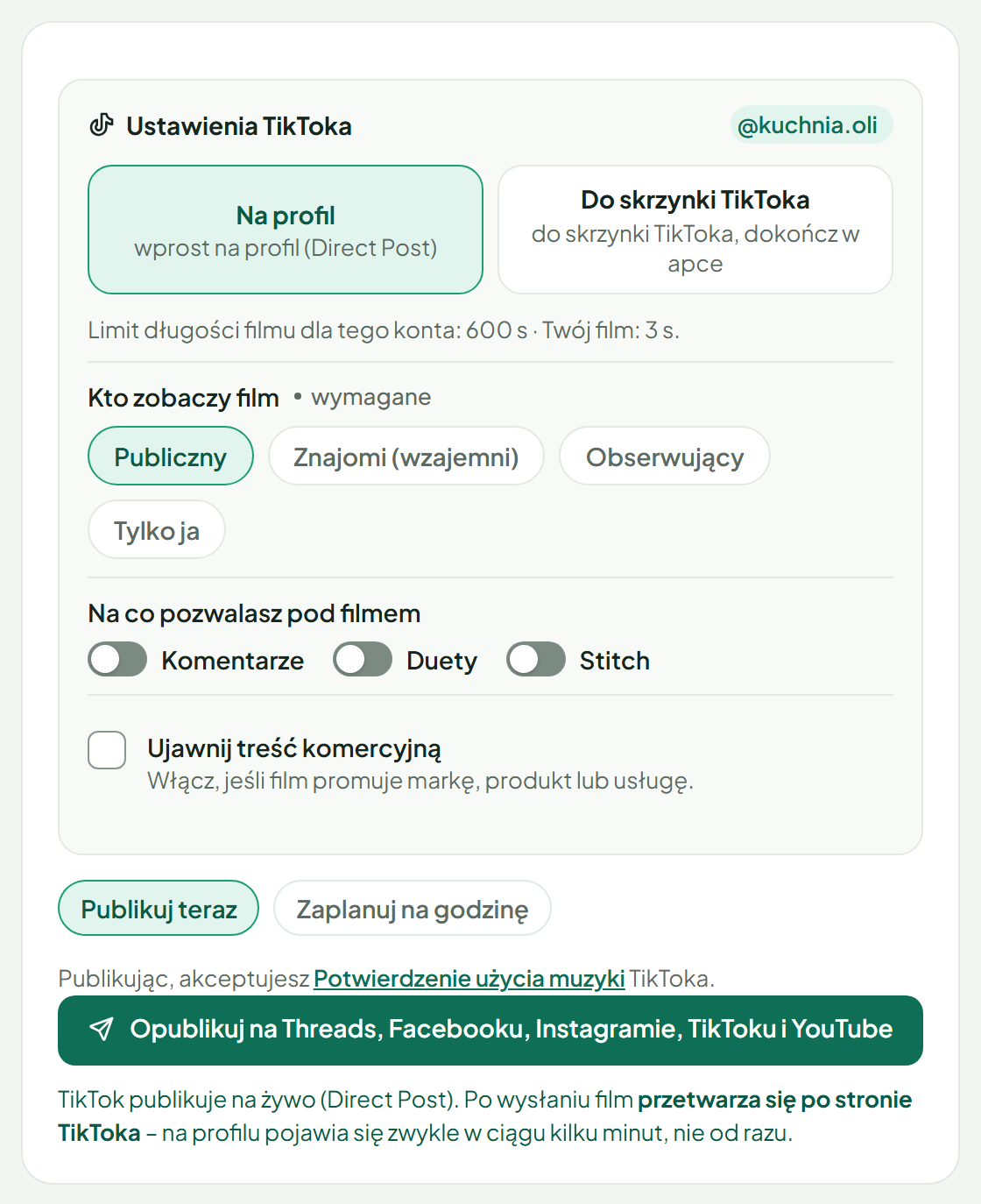
For TikTok specifically, the publishing screen follows TikTok's requirements: the privacy setting is loaded from your account and is never preselected for you, comment, duet and stitch options respect what your account allows, and commercial content can be disclosed as branded content or a paid partnership. The video is only sent after you click publish, or at the time you scheduled yourself.
For YouTube, TisRadar uploads a video to your own channel with the title (the first line of your text) and the description you wrote, as a public video that is not made for kids, in a default video category (People & Blogs) that you can change in YouTube Studio; if you mark the video as a paid partnership, YouTube's paid product placement flag is set as well. Whether it appears as a Short or as a regular video is decided by YouTube from the video itself. Photos and stories cannot be published to YouTube through TisRadar, and TisRadar does not edit or delete videos on your channel.
Team (Zespół plan). The account owner can add up to three team members. Each signs in with their own Google, Apple or email login and works only in the roles they are given (reels, posts, stories, deputy). A member with “Publikuje sam” publishes and schedules within their role on Facebook, Instagram and Threads; a member with “Tylko przygotowuje” saves a draft that the owner publishes. TikTok and YouTube publishing stays with the owner. A member's scheduled post goes out only if, at that moment, the member still has the right to publish it. Members never see access tokens, and the owner sees who did what in the account for 12 months.
Comment inbox
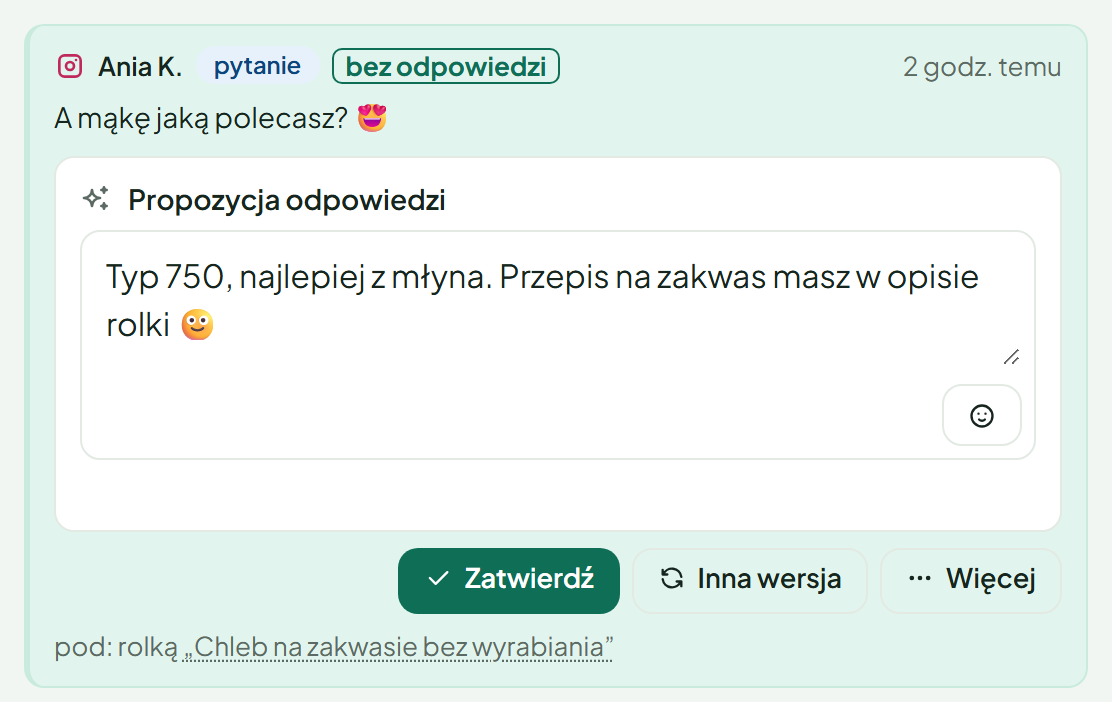
Comments left on your own Facebook, Instagram, Threads, YouTube and TikTok posts are collected into one inbox. An assistant classifies them (question, praise, complaint, spam) and drafts a possible reply, which is shown to you as a proposal – a reply is not sent until you approve it. On YouTube the inbox covers only the videos you published through TisRadar, and only comments that YouTube already shows publicly or that were hidden through TisRadar; you can reply to a comment, hide it (hiding moves it to “Held for review” in YouTube Studio) and show it again. YouTube's API has no way to like a comment, so TisRadar does not offer that there. On TikTok the inbox works through the separate “TikTok: comments and statistics” connection, which we are switching on gradually: it covers comments under your videos from the last 30 days, and you can reply to a comment, like it, hide it and show it again, each time only with your click. TikTok comments are not passed to any AI model; you answer them yourself.
Besides the keyword rule described below, ready answers are the other case in which a reply goes without approving it, and only if, when you publish or schedule a post, you also turn on a separate switch to send them without asking. The switch is off by default; while it is off, your answers only wait in the inbox, filled in, until you approve them. In the composer you write answers to questions viewers are likely to ask (for example how long the battery lasts), up to three versions of each, and you can let TisRadar thank comments that are plainly praise with one of your own sentences. When a comment under that post asks exactly what one of your answers covers, TisRadar replies publicly with your answer, word for word; the same AI model that classifies comments only recognises the match and never writes the text, and a thank-you sentence is picked from your list by the application. This works on Facebook, Instagram and Threads, and on Facebook a praised comment is also liked. It never answers hate or spam, a request for a link, a comment covered by a keyword rule or one that already has your reply, it replies to a comment at most once, and it stops after the daily limit (30 by default) and after the number of days you set (7 by default). Matches it is not sure about, and replies within a thread, wait in the inbox with your answer filled in. The inbox and the Content screen show a bar with Stop, which halts it at once, and your answers can be edited there; a change applies from the next reply.
One kind of comment is handled without a click: a comment written in the last seven days that contains a link to another website, meaning an address TisRadar does not know as yours, is hidden when TisRadar processes it, on Facebook, Instagram and Threads, and on YouTube only once you switch this on in the inbox (until then, on YouTube such a comment waits in the inbox with a suggestion to hide it). Your own addresses come from your product cards, message rules, connected Instagram and Threads profiles, your Facebook Page, your posts (also under another form of their address, such as /p/ instead of /reel/) and the list of addresses in Settings. A comment with text next to such a link is hidden this way only once TisRadar knows where you send viewers (your product cards, message rules or that list). Before that, and also when the link leads to another page of a website from your product cards or message rules that is not yet on that list, the inbox only suggests hiding it and waits for your click. A comment on Facebook or Instagram whose whole text or first line your message rule for that post recognises as its keyword, and a comment you have already replied to, are never hidden automatically. TisRadar hides at most 20 comments this way per profile in an hour; above that, and for a shortened or shared platform link (for example fb.watch) that may lead to your own post, the inbox only suggests hiding it. No AI is involved: the application compares the addresses. The inbox marks a hidden comment as hidden automatically, and one click on Show again brings it back.
Separately, on Facebook and Instagram you can set up a rule for a chosen post: when a viewer comments the agreed keyword, or clearly asks for the product, they automatically receive the private message and link you prepared in advance, and a short public reply appears under their comment, unless they ask why the link comes in a private message or complain about it: then the comment waits in your inbox for your own answer. You decide the keyword and the wording; after that the rule works on its own, sends to each viewer only once and respects the daily limit you set for each keyword, sending messages held back by it the next morning (details in § 18 of the Terms of Service). Threads offers no private messages through its API, so under a Threads copy of the same content the rule answers a comment written in the last seven days that clearly asks for the product with a public reply containing the link, unless a reply of yours is already under it. TikTok is not part of these features: TisRadar cannot send TikTok direct messages and does nothing to TikTok comments without your click. YouTube is part of the inbox but not of ready answers or of the rule: it offers no private messages through its API, so TisRadar cannot send any there.
Assistant
A chat panel that answers questions about your own data – for example how a given post performed compared with its group, or how follower counts moved over the last weeks. It reads the numbers already collected in TisRadar and draws charts from them.